Use Webhook to subscribe events
Webhook usage process
The first step: Configure Webhook related information in EventMesh and start
Configuration:
# Webhook HTTP payload listening port
eventMesh.server.http.port=10105
# Webhook config admin port
eventMesh.server.admin.http.port=10106

# Whether to start the Webhook admin service
eventMesh.webHook.admin.start=true

# Webhook event configuration storage mode. But currently only supports file and nacos
eventMesh.webHook.operationMode=file

# The file path of fileMode. If you write #{eventMeshHome}, in the eventMesh root directory
eventMesh.webHook.fileMode.filePath= #{eventMeshHome}/webhook

# The nacos storage mode. The configuration naming rule is eventMesh.webHook.nacosMode.{nacos native configuration key} For the specific configuration, please see [nacos github api](https://github.com/alibaba/nacos/blob/develop/api/src/main/java /com/alibaba/nacos/api/SystemPropertyKeyConst.java)
## address of nacos
eventMesh.webHook.nacosMode.serverAddr=127.0.0.1:8848

# Webhook CloudEvent sending mode. This property is the same as the eventMesh.storage.plugin.type configuration.
eventMesh.webHook.producer.connector=standalone
The second step: Add Webhook configuration information
Configuration information description:
   /**
    * The path called by the manufacturer. Manufacturer event call address, [http or https]://[domain or IP]:[port]/webhook/[callbackPath]
    * for example: http://127.0.0.1:10105/webhook/test/event , The full url needs to be filled in the manufacturer call input
    * callbackPath is the only
    */
    private String callbackPath;

    /**
     * manufacturer name, like github
     */
    private String manufacturerName;

    /**
     * manufacturer domain name, like www.github.com
     */
    private String manufacturerDomain;

    /**
     * Webhook event name, like rep-push
     */
    private String manufacturerEventName;

    /**
     * http header content type
     */
    private String contentType = "application/json";

    /**
     * description of this WebHookConfig
     */
    private String description;

    /**
     * secret key, for authentication
     */
    private String secret;

    /**
     * userName, for HTTP authentication
     */
    private String userName;

    /**
     * password, for HTTP authentication
     */
    private String password;

    /**
     * roll out event name, like topic to mq
     */
    private String cloudEventName;

    /**
     * roll out data format -> CloudEvent serialization mode
     * If HTTP protocol is used, the request header contentType needs to be marked
     */
    private String dataContentType = "application/json";

    /**
     * id of cloudEvent, like uuid/manufacturerEventId
     */
    private String cloudEventIdGenerateMode;
Add WebHook config
path: /webhook/insertWebHookConfig
method: POST
contentType: application/json
input params:
| field | desc | type | necessary | default |
|---|---|---|---|---|
| callbackPath | call address, unique address | string | Y | null |
| manufacturerName | manufacturer name | string | Y | null |
| manufacturerDomain | manufacturer domain name | string | Y | null |
| manufacturerEventName | manufacturer event name | string | Y | null |
| contentType | http connettype | string | N | application/json |
| description | configuration instructions | string | N | null |
| secret | signature string | string | N | null |
| userName | username | string | N | null |
| password | password | string | N | null |
| cloudEventName | cloudEvent name | string | Y | null |
| cloudEventIdGenerateMode | cloudEvent event object identification method, uuid or event id | string | N | manufacturerEventId |
E.g:
{
    "callbackPath":"/webhook/github/eventmesh/all",
    "manufacturerName":"github",
    "manufacturerDomain":"www.github.com",
    "manufacturerEventName":"all",
    "cloudEventName":"github-eventmesh"
}
Output params: 1 for success, 0 for failure
Query WebHook config by callback path
path: /webhook/queryWebHookConfigById
method: POST
contentType: application/json
input params:
| field | desc | type | necessary | default |
|---|---|---|---|---|
| callbackPath | call address, unique address | string | Y | null |
| manufacturerName | the caller of this callbackPath belongs to | string | Y | null |
E.g:
{
    "callbackPath":"/webhook/github/eventmesh/all",
    "manufacturerName":"github"
}
Output params:
| field | desc | type | necessary | default |
|---|---|---|---|---|
| callbackPath | call address, unique address | string | Y | null |
| manufacturerName | manufacturer name | string | Y | null |
| manufacturerDomain | manufacturer domain name | string | Y | null |
| manufacturerEventName | manufacturer event name | string | Y | null |
| contentType | http connettype | string | N | application/json |
| description | configuration instructions | string | N | null |
| secret | signature key | string | N | null |
| userName | user name | string | N | null |
| password | password | string | N | null |
| cloudEventName | cloudEvent name | string | Y | null |
| cloudEventIdGenerateMode | cloudEvent event object identification method, uuid or event id | string | N | manufacturerEventId |
Query WebHook config by manufacturer
path: /webhook/queryWebHookConfigByManufacturer
method: POST
contentType: application/json
input params:
| field | desc | type | necessary | default |
|---|---|---|---|---|
| manufacturerName | manufacturer name | string | Y | null |
| pageNum | page number of paging query | string | Y | null |
| pageSize | page size of each page | string | Y | null |
E.g:
{
    "manufacturerName":"github",
    "pageNum":1,
    "pageSize":2
}
Output params:
| field | desc | type | necessary | default |
|---|---|---|---|---|
| callbackPath | call address, unique address | string | Y | null |
| manufacturerName | manufacturer name | string | Y | null |
| manufacturerDomain | manufacturer domain name | string | Y | null |
| manufacturerEventName | manufacturer event name | string | Y | null |
| contentType | http connettype | string | N | application/json |
| description | configuration instructions | string | N | null |
| secret | signature key | string | N | null |
| userName | user name | string | N | null |
| password | password | string | N | null |
| cloudEventName | cloudEvent name | string | Y | null |
| cloudEventIdGenerateMode | cloudEvent event object identification method, uuid or event id | string | N | manufacturerEventId |
Update WebHook config
path: /webhook/updateWebHookConfig
method: POST
contentType: application/json
input params:
| field | desc | type | necessary | default |
|---|---|---|---|---|
| callbackPath | call address, unique address | string | Y | null |
| manufacturerName | manufacturer name | string | Y | null |
| manufacturerDomain | manufacturer domain name | string | Y | null |
| manufacturerEventName | manufacturer event name | string | Y | null |
| contentType | http connettype | string | N | application/json |
| description | configuration instructions | string | N | null |
| secret | signature string | string | N | null |
| userName | username | string | N | null |
| password | password | string | N | null |
| cloudEventName | cloudEvent name | string | Y | null |
| cloudEventIdGenerateMode | cloudEvent event object identification method, uuid or event id | string | N | manufacturerEventId |
E.g:
{
    "callbackPath":"/webhook/github/eventmesh/all",
    "manufacturerName":"github",
    "manufacturerDomain":"www.github.com",
    "manufacturerEventName":"all",
    "cloudEventName":"github-eventmesh"
}
Output params: 1 for success, 0 for failure
Delete WebHook config
path: /webhook/deleteWebHookConfig
method: POST
contentType: application/json
input params:
| field | desc | type | necessary | default |
|---|---|---|---|---|
| callbackPath | call address, unique address | string | Y | null |
| manufacturerName | the caller of this callbackPath belongs to | string | Y | null |
E.g:
{
    "callbackPath":"/webhook/github/eventmesh/all",
    "manufacturerName":"github"
}
Output params: 1 for success, 0 for failure
The third step: Check if the configuration is successful
- file storage mode. Please go to the eventMesh.webHook.fileMode.filePath directory to view. The Filename is callbackPath.
- nacos storage mode. Please go to the nacos service configured by eventMesh.webHook.nacosMode.serverAddr to see this.
The fourth step: Configure the consumer of cloudevent
The fifth step: Configure Webhook related information in the manufacturer
For manufacturer's operation, please refer to Manufacturer's Webhook operation instructions.
Manufacturer's Webhook operation instructions
GitHub sign up
The first step: Enter the corresponding project
The second step: click setting

The third step: click Webhooks
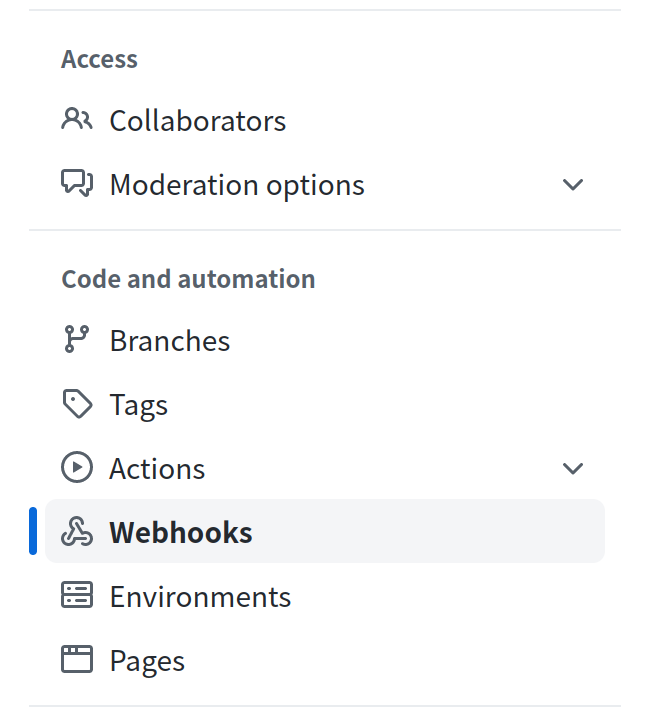
The fourth step: Click on Add Webhook

The fifth step: Fill in the Webhook information

Payload URL: EventMesh service address and callbackPath, which must include the protocol header. For example, when the callback address callbackPath is /webhook/github/eventmesh/all, the Payload URL is http://www.example.com:10105/webhook/github/eventmesh/all.
[http or https]://[domain or IP]:[port]/webhook/[callbackPath]
Content type: http header content type
Secret: signature string