使用 Webhook 订阅事件
Webhook 使用流程
第一步:在 EventMesh 配置 Webhook 相关信息并且启动
配置说明:
# Webhook HTTP payload 监听端口
eventMesh.server.http.port=10105
# Webhook 配置管理端口
eventMesh.server.admin.http.port=10106

# 是否启动 Webhook admin 服务
eventMesh.webHook.admin.start=true

# Webhook 事件配置存储模式。目前只支持 file 与 nacos
eventMesh.webHook.operationMode=file
# 文件存储模式的文件存放路径,如果写上#{eventMeshHome},在 eventMesh 根目录
eventMesh.webHook.fileMode.filePath= #{eventMeshHome}/webhook

# nacos 存储模式,配置命名规则是 eventMesh.webHook.nacosMode.{nacos 原生配置 key} 具体的配置请看 [nacos github api](https://github.com/alibaba/nacos/blob/develop/api/src/main/java/com/alibaba/nacos/api/SystemPropertyKeyConst.java)
## nacos 的地址
eventMesh.webHook.nacosMode.serverAddr=127.0.0.1:8848

# Webhook CloudEvent 发送模式。与 eventMesh.connector.plugin.type 配置一样
eventMesh.webHook.producer.connector=standalone
第二步:添加 Webhook 配置信息
配置信息说明:
   /**
    * 厂商发送事件时调用的地址。[http or https]://[domain or IP]:[port]/webhook/[callbackPath]
    * 在厂商的 Webhook 配置中需要填写完整 url,比如:http://127.0.0.1:10105/webhook/test/event
    * callbackPath 唯一
    * manufacturer callback path
    */
    private String callbackPath;

    /**
     * 厂商的名字
     * manufacturer name ,like github
     */
    private String manufacturerName;

    /**
     * 厂商的域名
     * manufacturer domain name, like www.github.com
     */
    private String manufacturerDomain;

    /**
     * 厂商的事件名
     * Webhook event name ,like rep-push
     */
    private String manufacturerEventName;

    /**
     *
     * http header content type
     */
    private String contentType = "application/json";

    /**
     * 说明
     * description of this WebHookConfig
     */
    private String description;

    /**
     * 有一些厂商使用验签方式,
     * secret key ,for authentication
     */
    private String secret;

    /**
     *  有一些厂商使用验签方式,使用账户密码方式
     * userName ,for HTTP authentication
     */
    private String userName;

    /**
     *  有一些厂商使用验签方式,使用账户密码方式
     * password ,for HTTP authentication
     */
    private String password;

    /**
     * 事件发送到那个 topic
     * roll out event name ,like topic to mq
     */
    private String cloudEventName;

    /**
     * roll out data format -> CloudEvent serialization mode
     * If HTTP protocol is used, the request header contentType needs to be marked
     */
    private String dataContentType = "application/json";

    /**
     * cloudEvent 事件对象唯一标识符识别方式,uuid 或者 manufacturerEventId(厂商 id)
     * id of cloudEvent ,like uuid/manufacturerEventId
     */
    private String cloudEventIdGenerateMode;
添加接口
路径: /webhook/insertWebHookConfig
方法:POST
contentType: application/json
输入参数:
| 字段 | 说明 | 类型 | 必须 | 默认值 |
|---|---|---|---|---|
| callbackPath | 调用地址,唯一地址 | string | 是 | null |
| manufacturerName | 厂商名 | string | 是 | null |
| manufacturerDomain | 厂商的域名 | string | 是 | null |
| manufacturerEventName | 厂商事件名 | string | 是 | null |
| contentType | http connettype | string | 否 | application/json |
| description | 配置说明 | string | 否 | null |
| secret | 验签密钥 | string | 是 | null |
| userName | 用户名 | string | 否 | null |
| password | 用户密码 | string | 否 | null |
| cloudEventName | 事件名 | string | 是 | null |
| cloudEventIdGenerateMode | cloudEvent 事件对象唯一标识符识别方式,uuid 或者 manufacturerEventId(厂商 id) | string | 否 | manufacturerEventId |
例子:
{
    "callbackPath":"/webhook/github/eventmesh/all",
    "manufacturerName":"github",
    "manufacturerDomain":"www.github.com",
    "manufacturerEventName":"all",
    "cloudEventName":"github-eventmesh",
    "secret": "testSecret"
}
输出参数:1 成功,0 失败
通过 callbackPath 查询 WebHookConfig
路径: /webhook/queryWebHookConfigById
方法:POST
contentType: application/json
输入参数: | 字段 | 说明 | 类型 | 必须 | 默认值 | | -- | -- | -- | -- | -- | | callbackPath | 调用地址,唯一地址 | string | 是 | null | | manufacturerName | 调用地址的提供方 | string | 是 | null |
例子:
{
    "callbackPath":"/webhook/github/eventmesh/all",
    "manufacturerName":"github"
}
输出参数:
| 字段 | 说明 | 类型 | 必须 | 默认值 |
|---|---|---|---|---|
| callbackPath | 调用地址,唯一地址 | string | 是 | null |
| manufacturerName | 厂商名 | string | 是 | null |
| manufacturerDomain | 厂商的域名 | string | 是 | null |
| manufacturerEventName | 厂商事件名 | string | 是 | null |
| contentType | http connettype | string | 否 | application/json |
| description | 配置说明 | string | 否 | null |
| secret | 验签密钥 | string | 是 | null |
| userName | 用户名 | string | 否 | null |
| password | 用户密码 | string | 否 | null |
| cloudEventName | 事件名() | string | 是 | null |
| cloudEventIdGenerateMode | cloudEvent 事件对象唯一标识符识别方式,uuid 或者 manufacturerEventId(厂商 id) | string | 否 | manufacturerEventId |
通过 manufacturer 查询 WebHookConfig 列表
路径: /webhook/queryWebHookConfigByManufacturer
方法:POST
contentType: application/json
输入参数:
| 字段 | 说明 | 类型 | 必须 | 默认值 |
|---|---|---|---|---|
| manufacturerName | 厂商名 | string | 是 | null |
| pageNum | 分页查询中的页数 | string | 是 | null |
| pageSize | 每一页的结果数量 | string | 是 | null |
例子:
{
    "manufacturerName":"github",
    "pageNum":1,
    "pageSize":2
}
输出参数:
| 字段 | 说明 | 类型 | 必须 | 默认值 |
|---|---|---|---|---|
| callbackPath | 调用地址,唯一地址 | string | 是 | null |
| manufacturerName | 厂商名 | string | 是 | null |
| manufacturerDomain | 厂商的域名 | string | 是 | null |
| manufacturerEventName | 厂商事件名 | string | 是 | null |
| contentType | http connettype | string | 否 | application/json |
| description | 配置说明 | string | 否 | null |
| secret | 验签密钥 | string | 是 | null |
| userName | 用户名 | string | 否 | null |
| password | 用户密码 | string | 否 | null |
| cloudEventName | 事件名() | string | 是 | null |
| cloudEventIdGenerateMode | cloudEvent 事件对象唯一标识符识别方式,uuid 或者 manufacturerEventId(厂商 id) | string | 否 | manufacturerEventId |
更新接口
路径: /webhook/updateWebHookConfig
方法:POST
contentType: application/json
输入参数:
| 字段 | 说明 | 类型 | 必须 | 默认值 |
|---|---|---|---|---|
| callbackPath | 调用地址,唯一地址 | string | 是 | null |
| manufacturerName | 厂商名 | string | 是 | null |
| manufacturerDomain | 厂商的域名 | string | 是 | null |
| manufacturerEventName | 厂商事件名 | string | 是 | null |
| contentType | http connettype | string | 否 | application/json |
| description | 配置说明 | string | 否 | null |
| secret | 验签密钥 | string | 是 | null |
| userName | 用户名 | string | 否 | null |
| password | 用户密码 | string | 否 | null |
| cloudEventName | 事件名 | string | 是 | null |
| cloudEventIdGenerateMode | cloudEvent 事件对象唯一标识符识别方式,uuid 或者 manufacturerEventId(厂商 id) | string | 否 | manufacturerEventId |
例子:
{
    "callbackPath":"/webhook/github/eventmesh/all",
    "manufacturerName":"github",
    "manufacturerDomain":"www.github.com",
    "manufacturerEventName":"all",
    "cloudEventName":"github-eventmesh",
    "secret": "testSecret"
}
输出参数:1 成功,0 失败
删除接口
路径: /webhook/deleteWebHookConfig
方法:POST
contentType: application/json
输入参数:
| 字段 | 说明 | 类型 | 必须 | 默认值 |
|---|---|---|---|---|
| callbackPath | 调用地址,唯一地址 | string | 是 | null |
| manufacturerName | 调用地址的提供方 | string | 是 | null |
例子:
{
    "callbackPath":"/webhook/github/eventmesh/all",
    "manufacturerName":"github"
}
输出参数:1 成功,0 失败
第三步:查看配置是否成功
- file 存储模式。请到 eventMesh.webHook.fileMode.filePath 目录下查看。文件名为
/转换为.的 callbackPath。 - nacos 存储模式。请到 eventMesh.webHook.nacosMode.serverAddr 配置的 nacos 服务中查看。
第四步:配置 cloudevent 的消费者
第五步:在厂商配置 Webhook 相关信息
厂商操作请看 厂商 Webhook 操作说明
厂商 Webhook 操作说明
github 注册
第一步:进入对应的项目
第二步:点击 setting

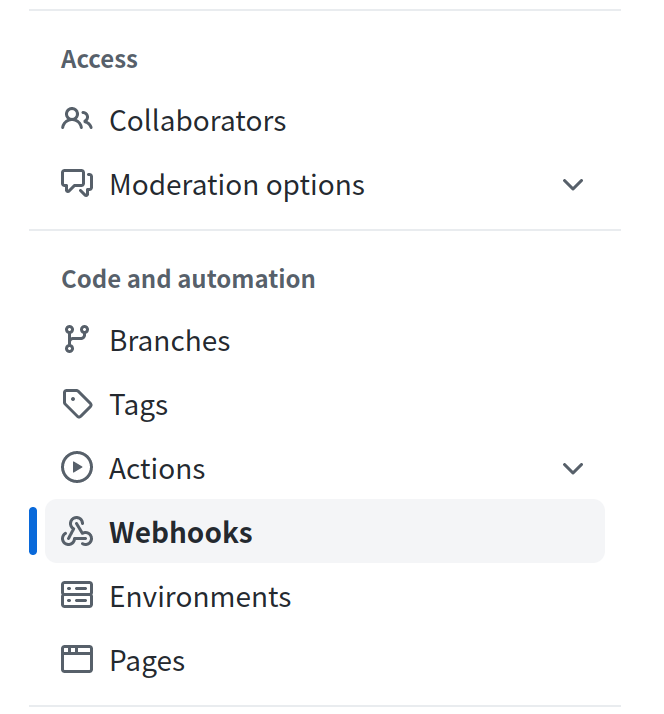
第三步:点击 Webhooks
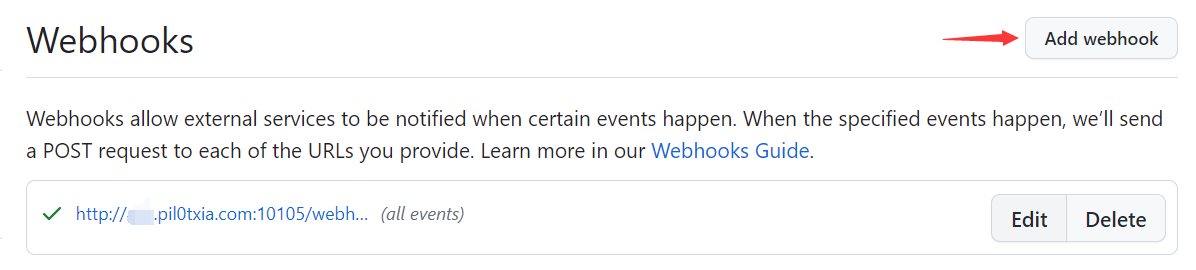
第四步:点击 Add webhook
第五步:填写 webhook 信息

Payload URL: EventMesh 服务地址和调用地址,需包含协议头。例如,当调用地址 callbackPath 为 /webhook/github/eventmesh/all 时,Payload URL 为 http://www.example.com:10105/webhook/github/eventmesh/all
Content Type: http header content type
Secret: 验签字符串